How To Boost Your Firm’s Visibility With Google Local Service Ads
One of the most important aspects of running any modern business is brand awareness. As an attorney, you work in one of the most inherently competitive industries on the planet. There are likely dozens, if not hundreds, of competing law firms and independent attorneys offering services similar to your own in your local area. Capturing your local market takes a tremendous amount of effort and research. Luckily, local service ads for law firms can help you ensure your firm is one of the first search results a potential client sees when looking for legal services on Google.
Understanding the Local Service Ads System on Google Search
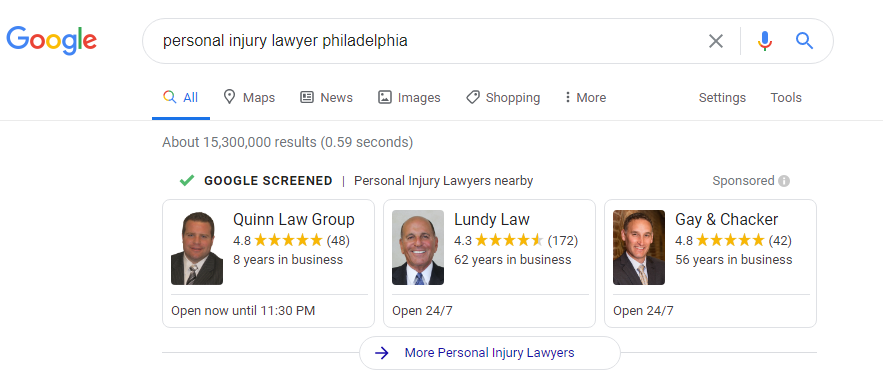
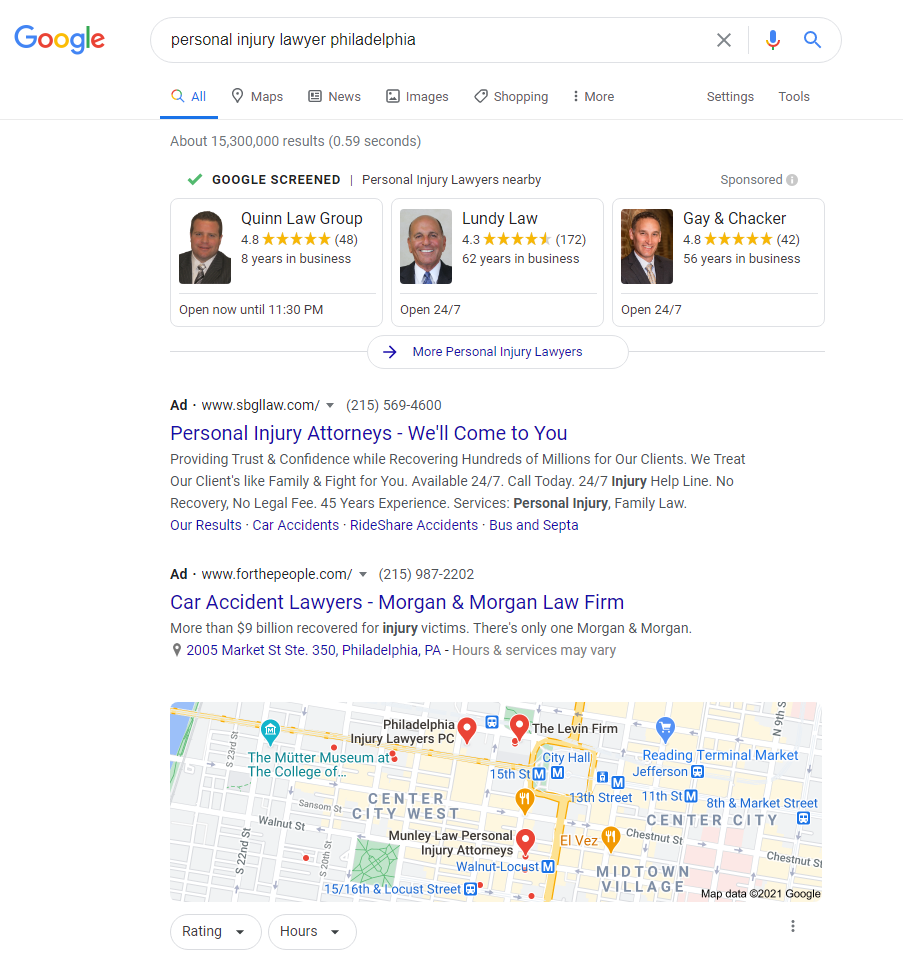
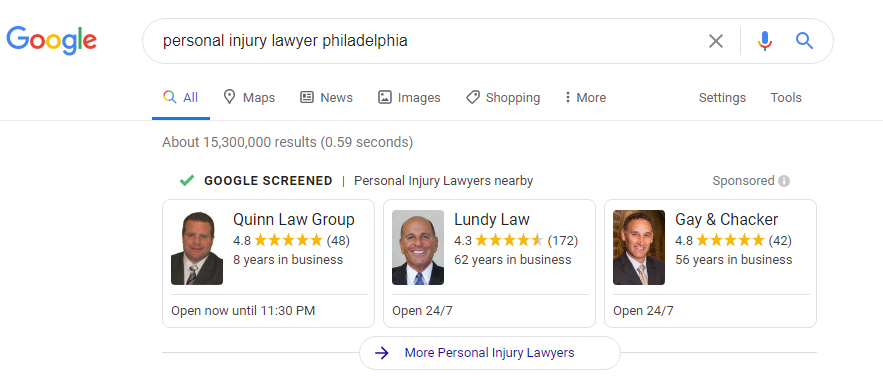
When a Google user performs a search for local attorneys, their search results will look something like this:
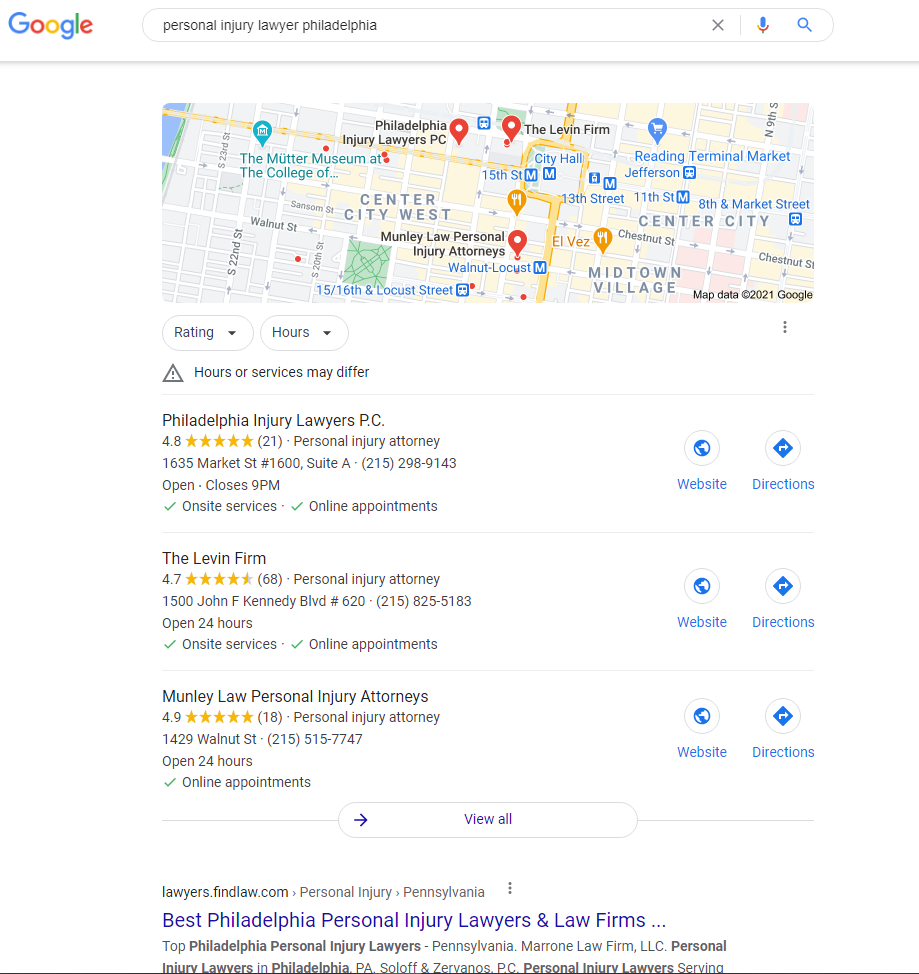
As you can see, the local service ads are the very first entries to appear on the user’s results page, followed by the usual pay-per-click ads. The third segment of the search results contains relevant Google My Business listings:
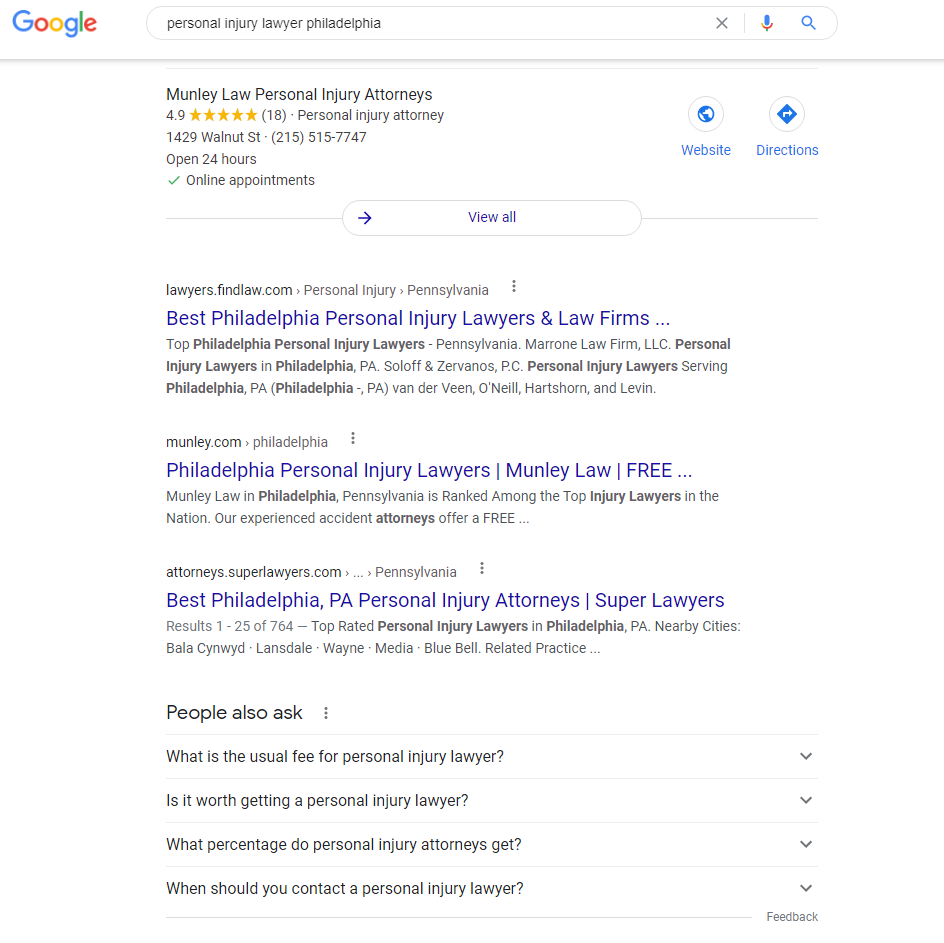
Finally, the user will see organic search results with a segment of related common search queries:
If you want to grow your firm’s client base and attract new clients on a consistent basis, it’s vital to understand how to leverage the power of Google AdWords and create local service ads for every one of your service areas.
How Does AdWords Work for Lawyers?
Google AdWords is a staple of modern digital marketing for good reason. AdWords allows a business owner to research and curate the best keywords for a more robust SEO strategy. This invaluable toolkit is available to business owners of all sizes across all industries. However, many attorneys in smaller practices have likely found it difficult to compete against larger firms with larger marketing budgets.
After looking at the example search results above, you should notice that it’s obviously going to be very difficult for some smaller law firms to compete with larger firms that pay top bid prices for pay-per-click ads and robust Google My Business listings. With local service ads for lawyers, Google aims to level the playing field with a pay-per-lead cost basis. This means, instead of paying every time someone clicks on your firm’s PPC ad, you only pay when a click translates into a bona fide lead for your business.
Google adapted this system to account for the fact that while many smaller law firms lack the financial liquidity to compete with larger firms, they are very capable of delivering fantastic customer experiences. If your firm does not have the budget to compete in the PPC field, creating local service ads can be an incredibly effective alternative.
How Do I Create a Local Service Ads for My Firm?
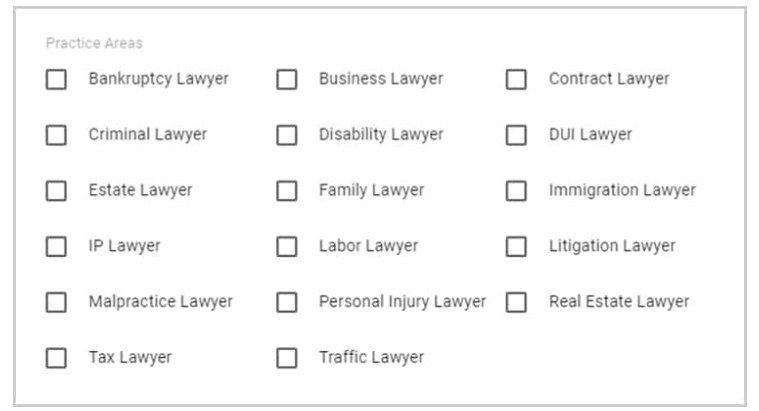
When Google implements new ideas into their paid advertising platforms, they typically roll out the new functionality to select groups for testing. Now, Local Service Ads from Google are available to attorneys covering a broad range of practice areas:
If your firm provides any of these legal services, you can start the process of creating a local service ad for your practice. If you already have a Google My Business listing, you’ll notice that the process of creating a Local Service Ad profile for your law firm is much more extensive than your profile for Google My Business. Be sure to fill every entry field accurately, especially when it comes to Year Founded, to establish your firm’s work history in your area and Languages Spoken. If your firm can provide multilingual legal services, this is a fantastic differentiating factor that will set your firm apart from your competition.
The next set of steps for configuring your profile pertain to your geographic location and contact information. For example, you’ll need to designate your service areas on a map and provide their respective zip codes. It’s not uncommon for smaller law firms to provide legal services in several local areas or maintain multiple offices. Make sure you include all relevant contact and geographic information for every office you operate.
The final step of the profile creation process for your Local Service Ad is to complete Google Screening. You will need to provide as much information as possible about your firm, and Google will conduct a verification process. The goal of Local Service Ads is to quickly connect search engine users with the law firms most likely to suit their needs, providing them with all the information they need within seconds.
How Do Local Service Ads for Law Firms Work?
Local Service Ads for law firms are only available to law firms that have completed the Google Screening process and successfully met Google’s pre-vetting standards. Since most search engine users are relying on their mobile devices to conduct searches and want to connect with attorneys as soon as possible, Local Service Ads incorporate click-to-call functionality and the ability for the user to click or tap to learn more about a potential law firm before placing a call.
The Google Screening process shows the search engine user that the attorneys listed in the Local Service Ads have met their standards and offer legal services relevant to the user’s search query. Notice the notification at the top of the Local Service Ads at the beginning of the search results:
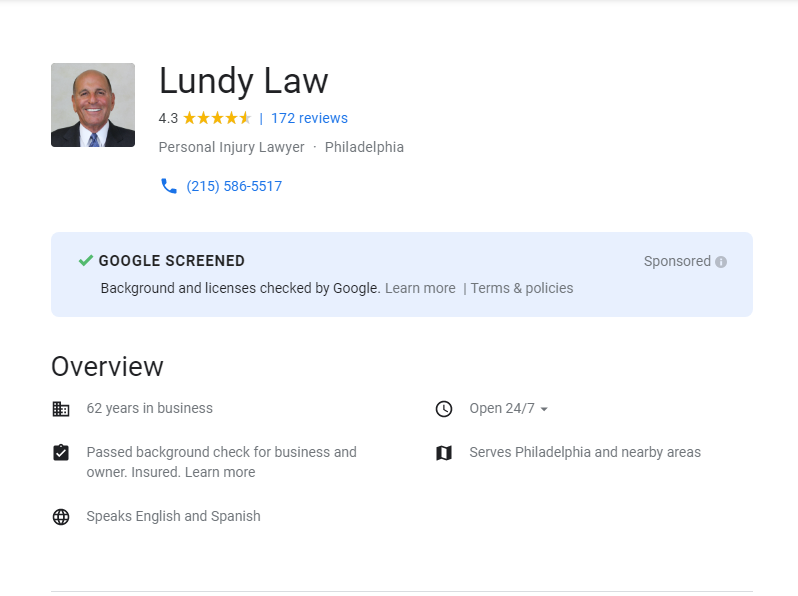
This tells the search engine user that Google has pre-vetted all of these Local Service Ads. For example, when the user clicks on the first entry, they can see that firm’s entire Google Screening report:
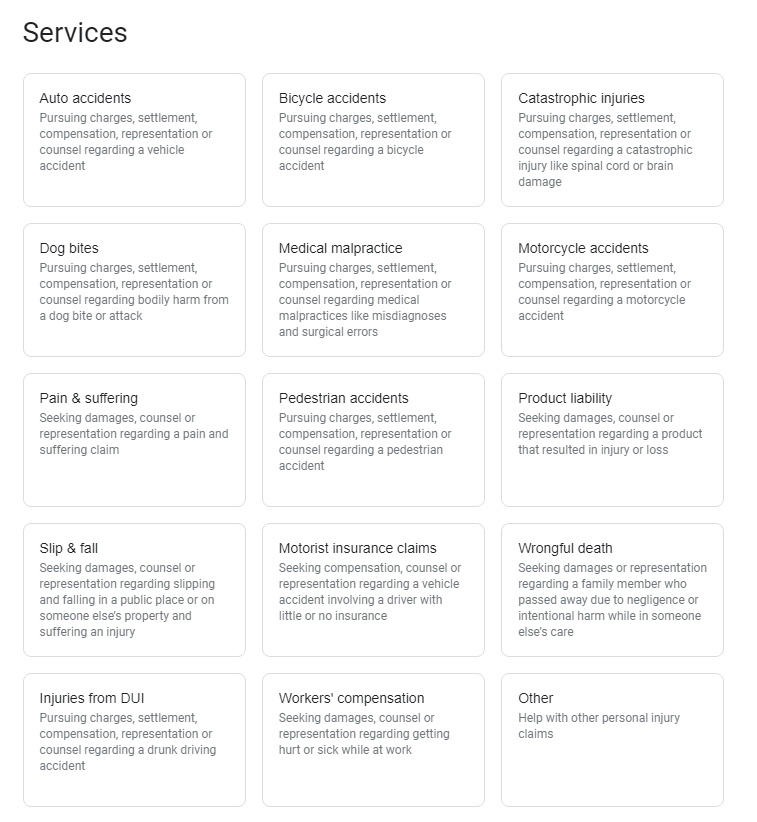
Below the basic information from the Google Screening report, the user can get more information about the services the law firm provides with a quick glance:
This page also contains easy links to Google Reviews, allowing the user to quickly compare the listing’s rating to other attorneys with Local Service Ads.
To complete the Google Screening process, you should be proactive and prepare the information you will need for your Local Service Ads listing. You must provide a headshot to accompany your ad. If multiple attorneys work at your law firm, it’s only necessary to provide one headshot for the lead or founding attorney.
Every licensed attorney at your firm must also agree to a background check and provide their Bar license information to Google. Additionally, you cannot qualify for Google Screening approval unless your law firm has a Google My Business score of 3 or higher. Google notifies applicants that the entire screening process can take two to five weeks to complete depending on the number of background checks required.
Making the “Top Three”
Notice in the first image above that the top three attorneys are all verified by Google Screening, and there is a button below their entries for more attorneys in the relevant practice area. It’s ideal for placing your firm within the top three, so how do you ensure your firm makes the cut? You need to know how Google evaluates law firms competing in this manner. Some of the factors Google uses to assign rankings to the top three Local Service Ads include:
The content of the user’s search, such as specific keywords used and the time of day.
Your firm’s Google Review score on Google My Business.
The proximity of your physical address to the user’s location.
Your listed business hours.
The amount you have bid in your Local Service Ads profile.
The number of positive (4+) reviews you have earned.
Your business’s record, such as the number of complaints filed against your practice.
How responsive your firm is to calls placed through your Local Service Ads.
These factors may seem difficult to manage, but the reality is that working with a qualified digital marketing agency will help you take full advantage of the potential Local Service Ads could hold for your business.
How Do I Advertise Myself as a Lawyer?
The best part about the Local Service Ads system for smaller law firms is that unlike PPC ads that charge the advertiser for every click, Local Service Ads only charge the advertiser when the search engine user uses click-to-call to contact the firm. This translates to the ability to pay only for qualified leads. Local Service Ads for law firms only charges per lead when a call lasts for 30 seconds or longer. This ensures that whatever budget you set for your firm’s Local Service Ad translates into actual value in the form of qualified leads.
Local Service Ads should become one branch of a multichannel marketing strategy. For the best results on Google, it’s essential to have a robust and balanced set of marketing channels that maximizes your firm’s exposure. Local Service Ads let you focus your efforts on your most important pool of potential clients: your local service areas. When people need legal services, they look nearby. You want to position your firm as the best available option when a Google user searches for law firms like yours from their mobile device.
Work With RizeUp Media to Expand Awareness of Your Firm
Navigating the complexities of modern digital marketing can be incredibly challenging while trying to run your business and serve your clients. RizeUp Media can help your law firm create a viable digital marketing strategy that capitalizes on your firm’s best-selling points to take full advantage of every marketing dollar you spend. Contact RizeUp Media today for more information about how we can help you take advantage of Local Service Ads for law firms as part of an effective multichannel marketing strategy.
About the author: Travis Hoechlin
Co-Founder and CEO of RizeUp Media
Travis Hoechlin is the Co-Founder and CEO of RizeUp Media, a digital marketing agency specializing in helping law firms grow through SEO, paid advertising, web design, and lead generation strategies. With over 15 years of experience in legal marketing, he focuses on building data-driven systems that help attorneys consistently attract and convert high-quality clients. Known for his results-oriented approach and deep industry expertise, Travis has worked with hundreds of law firms across the U.S. to improve their marketing performance and scale their practices.
Travis and his team are responsive, creative, and attentive. They are attuned to the specific needs of my business. Highly recommend them!
Dorie Rogers
We have been using large nation-wide firms for marketing. And as usual, initial good service that tails off and gets worse. When Bo decided to open his own firm, I trusted that his attention to detail and personal service would be great, and I was right. RizeUp has…
Juan Armenta
RizeUp Media has taken an active, turnkey approach to our digital marketing. They provide a strategic, integrated and cost-effective marketing plan that is tailored to our short- and long-term revenue growth objectives. I have worked with Bo Bryant & Travis Hoechlin for several years now and their expertise,…
Jason Martinez
RizeUp Media delivers! I have used other marketing services, but none compare to the outstanding results RizeUp delivers. The company is professional, friendly, helpful and deliver where other marketing services fall short. Highly recommended!!
Michelanne Hrubic
RizeUp has been terrific. Their team of truly experienced experts and professionals worked very hard to put our business first.
Andrew Chivinski
We have tried three different web development companies and RizeUp is really the strategic partner we were looking for. They went beyond just putting up a website. They focused on what made our firm different and our goals regarding which clients to reach. I truly feel that we…
Drummond McCunn
I have used them for several months, after switching from Findlaw. They rock.
Raymond Hane
I recently started working with RizeUp Media for my law firm’s website and SEO work. I am so impressed with this company and highly recommend them.
Bill Cumming
We switched to RizeUp early in the year, and the new web site launched 3 months ago. We've already seen a solid uptake in calls from the web site, and a higher number of potential clients. Very solid work, and the people are friendly, responsive, professional, and great…
Matt Bangerter
We switched providers to RizeUp Media a few months ago. I was tired of having to worry about our website and the SEO work that is required to keep up with all the changes in Google Search. My prior provider was not responsive and barely did anything. RizeUp…
Want to See How You Stack Up Against Competitors in Your Market?
Gain valuable insights into your competitors' strategies
and identify opportunities for growth with our
comprehensive analysis. Understand where you excel
and areas where you can improve to stay ahead in
your market.
Sequence rules uses cookies to track the order of requests a user has made and the time between requests and makes them available via Cloudflare Rules. This allows you to write rules that match valid or invalid sequences. The specific cookies used to validate sequences are called sequence cookies.
session
cf_ob_info
The cf_ob_info cookie provides information on: The HTTP Status Code returned by the origin web server. The Ray ID of the original failed request. The data center serving the traffic
session
cf_use_ob
The cf_use_ob cookie informs Cloudflare to fetch the requested resource from the Always Online cache on the designated port. Applicable values are: 0, 80, and 443. The cf_ob_info and cf_use_ob cookies are persistent cookies that expire after 30 seconds.
session
__cfwaitingroom
The __cfwaitingroom cookie is only used to track visitors that access a waiting room enabled host and path combination for a zone. Visitors using a browser that does not accept cookies cannot visit the host and path combination while the waiting room is active.
session
cf_chl_rc_i
These cookies are for internal use which allows Cloudflare to identify production issues on clients.
session
cf_chl_rc_ni
These cookies are for internal use which allows Cloudflare to identify production issues on clients.
session
cf_chl_rc_m
These cookies are for internal use which allows Cloudflare to identify production issues on clients.
session
__cfruid
Used by the content network, Cloudflare, to identify trusted web traffic.
session
__cf_bm
Cloudflare's bot products identify and mitigate automated traffic to protect your site from bad bots. Cloudflare places the __cf_bm cookie on End User devices that access Customer sites that are protected by Bot Management or Bot Fight Mode. The __cf_bm cookie is necessary for the proper functioning of these bot solutions.
session
__cflb
When enabling session affinity with Cloudflare Load Balancer, Cloudflare sets a __cflb cookie with a unique value on the first response to the requesting client. Cloudflare routes future requests to the same origin, optimizing network resource usage. In the event of a failover, Cloudflare sets a new __cflb cookie to direct future requests to the failover pool.
session
_cfuvid
The _cfuvid cookie is only set when a site uses this option in a Rate Limiting Rule, and is only used to allow the Cloudflare WAF to distinguish individual users who share the same IP address.
session
cf_clearance
Whether a CAPTCHA or Javascript challenge has been solved.
session
These cookies are needed for adding comments on this website.
Name
Description
Duration
comment_author
Used to track the user across multiple sessions.
Session
comment_author_email
Used to track the user across multiple sessions.
Session
comment_author_url
Used to track the user across multiple sessions.
Session
Name
Description
Duration
cookietest
Session
Google Tag Manager simplifies the management of marketing tags on your website without code changes.
Name
Description
Duration
cookiePreferences
Registers cookie preferences of a user
2 years
td
Registers statistical data on users' behaviour on the website. Used for internal analytics by the website operator.
session
Statistics cookies collect information anonymously. This information helps us understand how visitors use our website.


Name
Description
Duration
calltrk_session_id
-
calltrk_referrer
6 months
calltrk_nearest_tld
10 years
calltrk_landing
6 months
calltrk_fcid
-
Google Analytics is a powerful tool that tracks and analyzes website traffic for informed marketing decisions.
Used to monitor number of Google Analytics server requests
10 minutes
__utmb
Used to distinguish new sessions and visits. This cookie is set when the GA.js javascript library is loaded and there is no existing __utmb cookie. The cookie is updated every time data is sent to the Google Analytics server.
30 minutes after last activity
__utmc
Used only with old Urchin versions of Google Analytics and not with GA.js. Was used to distinguish between new sessions and visits at the end of a session.
End of session (browser)
__utmz
Contains information about the traffic source or campaign that directed user to the website. The cookie is set when the GA.js javascript is loaded and updated when data is sent to the Google Anaytics server
6 months after last activity
__utmv
Contains custom information set by the web developer via the _setCustomVar method in Google Analytics. This cookie is updated every time new data is sent to the Google Analytics server.
2 years after last activity
__utmx
Used to determine whether a user is included in an A / B or Multivariate test.
18 months
_ga
ID used to identify users
2 years
_gali
Used by Google Analytics to determine which links on a page are being clicked
30 seconds
_ga_
ID used to identify users
2 years
_gid
ID used to identify users for 24 hours after last activity
24 hours
_gat
Used to monitor number of Google Analytics server requests when using Google Tag Manager
1 minute
_gac_
Contains information related to marketing campaigns of the user. These are shared with Google AdWords / Google Ads when the Google Ads and Google Analytics accounts are linked together.
90 days
Hotjar is a powerful analytics tool that helps you understand user behavior through heatmaps and session recordings.
Name
Description
Duration
_hjSessionUser_3532443
-
_hjIncludedInSample
Hotjar cookie. This session cookie is set to let Hotjar know whether that visitor is included in the sample which is used to generate funnels.
365 days
_hjClosedSurveyInvites
Hotjar cookie. This cookie is set once a visitor interacts with a Survey invitation modal popup. It is used to ensure that the same invite does not re-appear if it has already been shown.
365 days
_hjDonePolls
Hotjar cookie. This cookie is set once a visitor completes a poll using the Feedback Poll widget. It is used to ensure that the same poll does not re-appear if it has already been filled in.
365 days
_hjMinimizedPolls
Hotjar cookie. This cookie is set once a visitor minimizes a Feedback Poll widget. It is used to ensure that the widget stays minimizes when the visitor navigates through your site.
365 days
_hjDoneTestersWidgets
Hotjar cookie. This cookie is set once a visitor submits their information in the Recruit User Testers widget. It is used to ensure that the same form does not re-appear if it has already been filled in.
365 days
_hjMinimizedTestersWidgets
Hotjar cookie. This cookie is set once a visitor minimizes a Recruit User Testers widget. It is used to ensure that the widget stays minimizes when the visitor navigates through your site.
365 days
_hjShownFeedbackMessage
This cookie is set when a visitor minimizes or completes Incoming Feedback. This is done so that the Incoming Feedback will load as minimized immediately if they navigate to another page where it is set to show.
365 days
_hjCachedUserAttributes
This cookie stores User Attributes which are sent through the Hotjar Identify API, whenever the user is not in the sample. These attributes will only be saved if the user interacts with a Hotjar Feedback tool.
session
_hjLocalStorageTest
This cookie is used to check if the Hotjar Tracking Script can use local storage. If it can, a value of 1 is set in this cookie. The data stored in_hjLocalStorageTest has no expiration time, but it is deleted immediately after creating it so the expected storage time is under 100ms.
-
_hjHasCachedUserAttributes
This cookie sets when a user first lands on a page. Persists the Hotjar User ID which is unique to that site. Hotjar does not track users across different sites. Ensures data from subsequent visits to the same site are attributed to the same user ID.
365 days
_hjid
Hotjar cookie. This cookie is set when the customer first lands on a page with the Hotjar script. It is used to persist the random user ID, unique to that site on the browser. This ensures that behavior in subsequent visits to the same site will be attributed to the same user ID.
365 days
hj_visitor
hotjar uses cookies to enhance the user’s experience on our website, for example to complete forms, navigating the site, and identify returning users and offer related content. Users can control the use of cookies at the individual browser level.
Session
_hjSessionUser_
Hotjar cookie that is set when a user first lands on a page with the Hotjar script. It is used to persist the Hotjar User ID, unique to that site on the browser. This ensures that behavior in subsequent visits to the same site will be attributed to the same user ID.
365 days
_hjSessionTooLarge
Causes Hotjar to stop collecting data if a session becomes too large. This is determined automatically by a signal from the WebSocket server if the session size exceeds the limit.
session
_hjSessionRejected
If present, this cookie will be set to 1 for the duration of a user’s session, if Hotjar rejected the session from connecting to our WebSocket due to server overload. This cookie is only applied in extremely rare situations to prevent severe performance issues.
session
_hjSessionResumed
A cookie that is set when a session/recording is reconnected to Hotjar servers after a break in connection.
session
hjViewportId
This cookie stores user viewport details such as size and dimensions.
Session
_hjSessionStorageTest
This cookie checks if the Hotjar Tracking Code can use Session Storage. If it can, a value of 1 is set.
Session
_hjTLDTest
When the Hotjar script executes we try to determine the most generic cookie path we should use, instead of the page hostname. This is done so that cookies can be shared across subdomains (where applicable). To determine this, we try to store the _hjTLDTest cookie for different URL substring alternatives until it fails. After this check, the cookie is removed.
session
_hjCookieTest
This cookie checks to see if the Hotjar Tracking Code can use cookies. If it can, a value of 1 is set.
Session
_hjUserAttributesHash
User Attributes sent through the Hotjar Identify API are cached for the duration of the session in order to know when an attribute has changed and needs to be updated.
session
_hjIncludedInSessionSample
This cookie is set to let Hotjar know whether that visitor is included in the data sampling defined by your site's daily session limit
30 minutes
_hjSession_
A cookie that holds the current session data. This ensues that subsequent requests within the session window will be attributed to the same Hotjar session.
30 minutes
_hjptid
This cookie is set for logged in users of Hotjar, who have Admin Team Member permissions. It is used during pricing experiments to show the Admin consistent pricing across the site.
session
_hjAbsoluteSessionInProgress
The cookie is set so Hotjar can track the beginning of the user's journey for a total session count. It does not contain any identifiable information.
30 minutes
_hjFirstSeen
The cookie is set so Hotjar can track the beginning of the user's journey for a total session count. It does not contain any identifiable information.
30 minutes
_hjIncludedInPageviewSample
This cookie is set to let Hotjar know whether that visitor is included in the data sampling defined by your site's page view limit.
30 minutes
Name
Description
Duration
fd_uuid
5 days
fd_showChatInvite
1 minute
fd_phoneNumber
5 minutes
fd_pageViews
5 days
fd_pageHistory
5 days
fd_mobileGreetingClosed
5 hours
fd_geoState
5 days
fd_geoCountry
5 days
fd_geoCity
5 days
fd_fvURL
5 days
fd_fvReferrer
5 days
fd_fvDate
5 days
fd_chatStatus
5 days
fd_chatOpened
1 minute
fd_chatClosed
5 days
fd_agentName
5 hours
Name
Description
Duration
_clsk
24 hours
_clck
-
Name
Description
Duration
ajs_anonymous_id
-
Name
Description
Duration
zscf527752538d745f0875ab01762bbc241
30 minutes
zpssr1781296951564
Session
zpssr1781296951559
Session
zps-tgr-dts
12 months
zft-sdc
-
zabUserId
-
Marketing cookies are used to follow visitors to websites. The intention is to show ads that are relevant and engaging to the individual user.
Name
Description
Duration
_gcl_au
-
_fbp
3 months
Bing, powered by Microsoft, is a search engine providing web, image, video, and map search capabilities.
Name
Description
Duration
_uetvid
1 year
_uetsid
24 hours
MSFPC
Identifies unique web browsers visiting Microsoft sites. These cookies are used for advertising, site analytics, and other operational purposes.
1 year
_uetsid
This cookie is used by Bing to determine what ads should be shown that may be relevant to the end user perusing the site.
30 minutes
_uetvid
This is a cookie utilised by Microsoft Bing Ads and is a tracking cookie. It allows us to engage with a user that has previously visited our website.
16 days
ANON
Contains the A, a unique identifier derived from your Microsoft account, which is used for advertising, personalization, and operational purposes. It is also used to preserve your choice to opt out of interest-based advertising from Microsoft if you have chosen to associate the opt-out with your Microsoft account.
1 year
ANONCHK
Used to store session ID for a users session to ensure that clicks from adverts on the Bing search engine are verified for reporting purposes and for personalisation
10 minutes
CC
Contains a country code as determined from your IP address.
1 year
PPAuth
Helps to authenticate you when you sign in with your Microsoft account.
5 years
MSPAuth
Helps to authenticate you when you sign in with your Microsoft account.
5 years
MSNRPSAuth
Helps to authenticate you when you sign in with your Microsoft account.
5 years
KievRPSAuth
Helps to authenticate you when you sign in with your Microsoft account.
5 years
MS0
Identifies a specific session.
End of session (browser)
MUIDB
Identifies unique web browsers visiting Microsoft sites. These cookies are used for advertising, site analytics, and other operational purposes.
1 year
_UR
This cookie is used by the Bing advertising network for advertising tracking purposes.
1 year
MC1
Identifies unique web browsers visiting Microsoft sites. These cookies are used for advertising, site analytics, and other operational purposes.
1 year
NAP
Contains an encrypted version of your country, postal code, age, gender, language and occupation, if known, based on your Microsoft account profile.
1 year
MH
Appears on co-branded sites where Microsoft is partnering with an advertiser. This cookie identifies the advertiser, so the right ad is selected.
End of session (browser)
childinfo
Contains information that Microsoft account uses within its pages in relation to child accounts.
5 years
kcdob
Contains information that Microsoft account uses within its pages in relation to child accounts.
5 years
kcrelid
Contains information that Microsoft account uses within its pages in relation to child accounts.
5 years
kcru
Contains information that Microsoft account uses within its pages in relation to child accounts.
5 years
pcfm
Contains information that Microsoft account uses within its pages in relation to child accounts.
5 years
x-ms-gateway-slice
Identifies a gateway for load balancing.
End of session (browser)
ToptOut
Records your decision not to receive interest-based advertising delivered by Microsoft.
1 year
ACH01
Maintains information about which ad and where the user clicked on the ad.
End of session (browser)
MSPProf
Helps to authenticate you when you sign in with your Microsoft account.
5 years
AADSSO
Microsoft Microsoft Online Authentication Cookie
End of session (browser)
_RwBf
This cookie helps us to track the effectiveness of advertising campaigns on the Bing advertising network.
1 year
brcap
Microsoft Microsoft Online Authentication Cookie
1 year
MC0
Detects whether cookies are enabled in the browser.
End of session (browser)
MR
Used to collect information for analytics purposes.
6 months
_HPVN
Analysis service that connects data from the Bing advertising network with actions performed on the website.
1 year
MUID
Identifies unique web browsers visiting Microsoft sites. These cookies are used for advertising, site analytics, and other operational purposes.
1 year
OID
This cookie is used by the Bing advertising network for advertising tracking purposes.
3 months
OIDI
This cookie is used by the Bing advertising network for advertising tracking purposes.
3 months
OIDR
This cookie is used by the Bing advertising network for advertising tracking purposes.
3 months
BCP
This cookie is used for advertisement tracking purposes.
1 year
BFBUSR
This cookie is used for advertisement tracking purposes.
1 year
BFB
This cookie is used for advertisement tracking purposes.
1 year
ACL
This cookie is used for advertisement tracking purposes.
3 months
ACLUSR
This cookie is used for advertisement tracking purposes.
1 year
MSPTC
This cookie registers data on the visitor. The information is used to optimize advertisement relevance.
1 year
WLSSC
Helps to authenticate you when you sign in with your Microsoft account.
5 years
SRM_B
Collected user data is specifically adapted to the user or device. The usercan also be followed outside of the loaded website, creating a picture of the visitor's behavior.
1 year
Google Ads is an online advertising platform that enables businesses to create targeted ads displayed on Google search results and partner sites.
Google uses cookies for advertising, including serving and rendering ads, personalizing ads (depending on your ad settings at g.co/adsettings), limiting the number of times an ad is shown to a user, muting ads you have chosen to stop seeing, and measuring the effectiveness of ads.
90 Days
_gcl_gb
Google uses cookies for advertising, including serving and rendering ads, personalizing ads (depending on your ad settings at g.co/adsettings), limiting the number of times an ad is shown to a user, muting ads you have chosen to stop seeing, and measuring the effectiveness of ads.
90 Days
_gac_gb_
Google uses cookies for advertising, including serving and rendering ads, personalizing ads (depending on your ad settings at g.co/adsettings), limiting the number of times an ad is shown to a user, muting ads you have chosen to stop seeing, and measuring the effectiveness of ads.
90 Days
FPGCLGB
Google uses cookies for advertising, including serving and rendering ads, personalizing ads (depending on your ad settings at g.co/adsettings), limiting the number of times an ad is shown to a user, muting ads you have chosen to stop seeing, and measuring the effectiveness of ads.
90 Days
FPGCLAW
Google uses cookies for advertising, including serving and rendering ads, personalizing ads (depending on your ad settings at g.co/adsettings), limiting the number of times an ad is shown to a user, muting ads you have chosen to stop seeing, and measuring the effectiveness of ads.
90 Days
__Secure-3PSIDCC
Targeting cookie. Used to create a user profile and display relevant and personalised Google Ads to the user.
2 years
__Secure-3PSIDTS
Targeting cookie. Used to create a user profile and display relevant and personalised Google Ads to the user.
2 years
__Secure-1PSIDTS
Targeting cookie. Used to create a user profile and display relevant and personalised Google Ads to the user.
2 years
__Secure-1PAPISID
Targeting cookie. Used to create a user profile and display relevant and personalised Google Ads to the user.
2 years
__Secure-3PSID
Targeting cookie. Used to profile the interests of website visitors and display relevant and personalised Google ads.
2 years
Conversion
Google uses cookies for advertising, including serving and rendering ads, personalizing ads (depending on your ad settings at g.co/adsettings), limiting the number of times an ad is shown to a user, muting ads you have chosen to stop seeing, and measuring the effectiveness of ads.
90 days
_gcl_aw
Google uses cookies for advertising, including serving and rendering ads, personalizing ads (depending on your ad settings at g.co/adsettings), limiting the number of times an ad is shown to a user, muting ads you have chosen to stop seeing, and measuring the effectiveness of ads.
90 Days
__Secure-1PSID
Targeting cookie. Used to create a user profile and display relevant and personalised Google Ads to the user.
2 years
__Secure-1PSIDCC
Targeting cookie. Used to create a user profile and display relevant and personalised Google Ads to the user.
2 years
__Secure-3PAPISID
Profiles the interests of website visitors to serve relevant and personalised ads through retargeting.
2 years
AEC
AEC cookies ensure that requests within a browsing session are made by the user, and not by other sites. These cookies prevent malicious sites from acting on behalf of a user without that user's knowledge.
6 months
ADS_VISITOR_ID
Cookie required to use the options and on-site web services
2 months
Name
Description
Duration
_li_dcdm_c
-
_lc2_fpi_js
-
_lc2_fpi
-
Name
Description
Duration
_reb2bli
-
_reb2bfxf
-
_reb2buid
-
_reb2btd
-
_reb2bsha
-
_reb2bsessionID
30 minutes
_reb2bloaded
a few seconds
_reb2bgeo
-
__test__
a few seconds
Name
Description
Duration
zc_show
12 months
zc_cu_exp
12 months
zc_cu
12 months
zc_consent
12 months
Name
Description
Duration
rizeupmedia-_zldt
24 hours
rizeupmedia-_zldp
2 years
You can find more information in our Privacy Policy and .